Home / Help / Bleed and safe zones
Help · Design
Bleed and safe zones
If your cards have a photo or a background that runs right to the edge, three printing words are worth knowing: trim, bleed and safe zone.
The three lines on every card
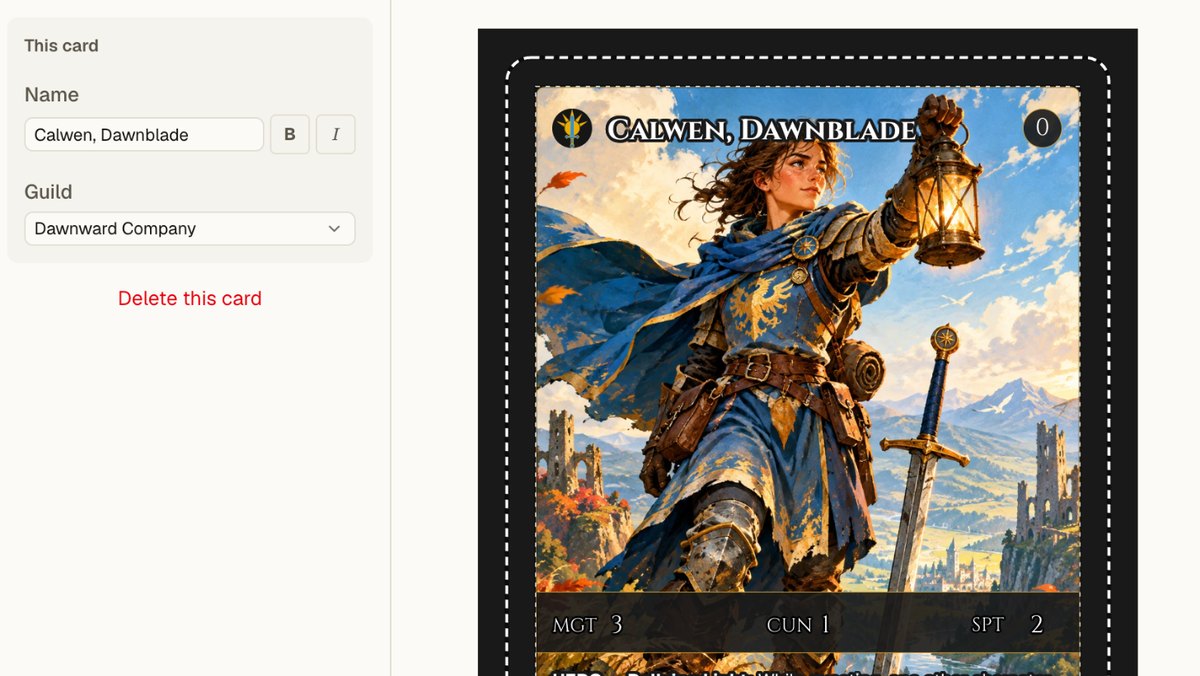
- Bleed. The faded outer band. Artwork that runs past the cut line and gets trimmed off. It's there so the color reaches the very edge of the finished card.
- Trim line. Where the card is cut. Everything inside it is your finished card. On a rounded-corner card, the corners are cut too.
- Safe zone. Keep text, faces, logos and numbers inside this line, so nothing important ends up close to the edge.
Why bleed exists
Cards are printed many to a large sheet, then cut apart. No cutting machine lands in exactly the same place every time. Each cut can drift by a tiny amount in any direction.
If your artwork stopped exactly at the cut line, a cut that drifted outward would leave a sliver of bare paper along one edge. That's the thin white line you sometimes see on cheaply printed cards. Bleed solves it: the artwork carries on a little past the cut, so wherever the blade lands, there's color under it.
Why the safe zone exists
The same drift works inward too. A cut can land a little inside the line, and the corners of a rounded card are cut away. Text placed right at the edge can end up touching it, or losing the tip of a letter.
The safe zone is a margin that keeps important things clear of all that. It also just looks better: text with a little room around it reads as designed rather than cramped.
What this means for your cards
Full-bleed photos and backgrounds
Let them fill the whole card, right to the edge. In the editor, a picture that covers the card covers the bleed as well, so you don't need to do anything extra.
Borders and frames
A border near the edge of the card will look uneven if a cut drifts, because one side ends up a little thinner than the other. A border that's comfortably thick hides this. A very thin border right at the edge shows it most.
Text, faces and numbers
Keep them inside the safe zone. That includes the small things that are easy to forget: a card number in a corner, a website on the back, a stat in a badge.
Rounded corners
If your deck has rounded corners, anything in the very corner of the card is cut away. Corner symbols, like the rank and suit on playing cards, should sit inside the safe zone, not tucked into the curve.
What ShufflePrints does for you
- The editor shows where the card will be cut and where the safe zone is, as you design.
- Card layouts made by the assistant keep text inside the safe zone from the start.
- When you order, ShufflePrints prepares the print file with the bleed already in place. There's nothing to export, measure or set up.
If you bring your own finished card art from another tool, make it the full size of the card with the background running to every edge, and keep anything important well inside. You can place it in the editor and check it against the lines there.
Questions
What is bleed in printing?
Bleed is extra artwork that extends past the edge where the card will be cut. Cutting is never perfectly exact, so the extra art makes sure the color reaches the very edge of the finished card instead of leaving a thin white line.
What is a safe zone?
The safe zone is the area a little inside the cut line where text, faces and anything important should stay, so the cut can never clip them.
Do I need to add bleed to my cards on ShufflePrints?
No. The editor shows where the card will be cut and where the safe zone is, and ShufflePrints prepares the print file for you. Just let background art run to the edge of the card and keep important things inside the safe zone.
Why does my card have a thin white edge?
A white edge usually means the artwork stopped at the cut line instead of running past it. When the cut lands a hair outside the line, the uncolored paper shows.